Quantities on the shopping list: “milk 2 l” instead of guessing
· 5 min read
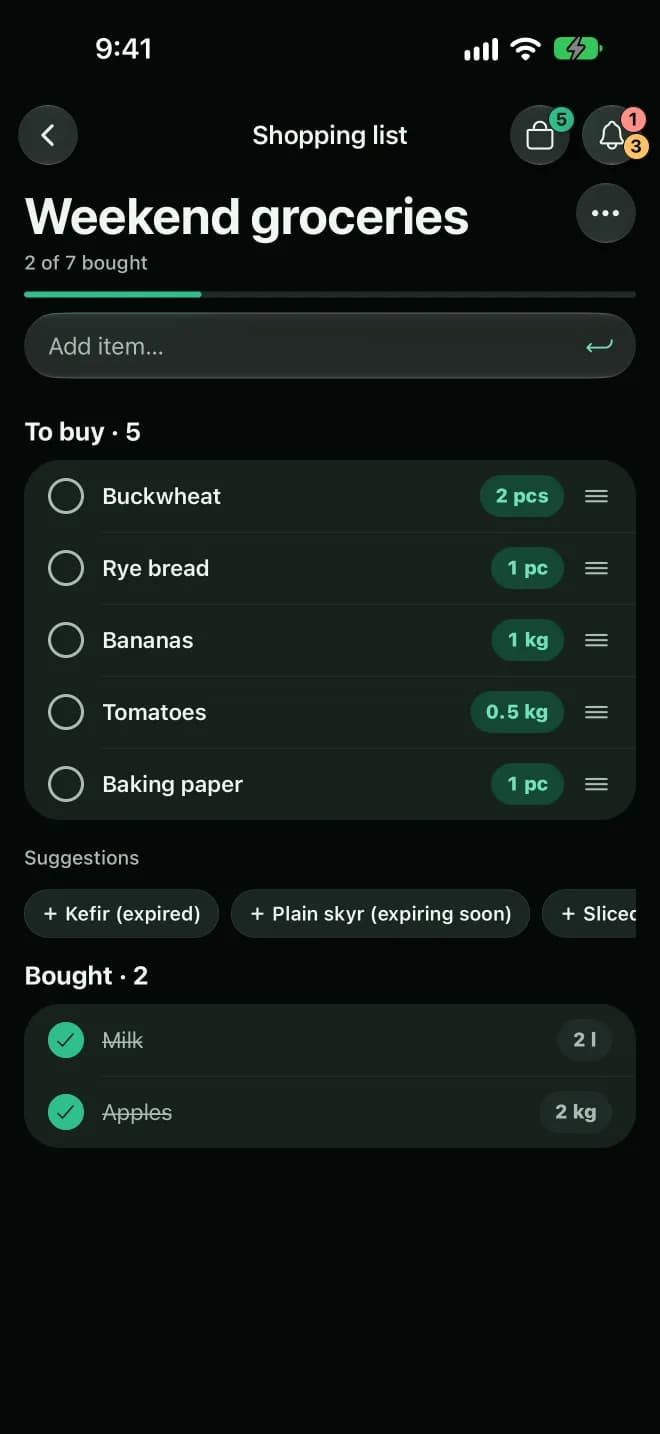
A name alone on a list invites a call from the shop: “how much milk?”. In Stocker every item can have a quantity and a unit, and the same numbers travel on: to the watch, to the Lock Screen and back into storage after shopping.
Type the quantity with the name
There is no form to open. Stocker reads the quantity from plain text in the Add item… field:
- “2l milk” or “milk 2 l”: milk, quantity 2 L,
- “water x6” or “x6 water”: water, 6 pcs,
- “6 cans cola”: cola, 6 cans,
- “juice 1.5 litres”: juice, 1.5 L.
The recognised quantity shows in the field as a pill before you add the item. Tap it to change or remove it. Numbers that are part of a name stay text: “iPhone 15”, “7up zero” or “100% juice” do not turn into a quantity.
Units and changing the quantity
You can choose pieces, packs, bottles, cans, litres, millilitres, kilograms and grams, and when none fits, “+ custom”, such as a crate or a multipack. A quantity can have a fraction: 0.5 kg of tomatoes, 1.5 L of juice.
- Tap the pill to open the Quantity sheet: − and + buttons, a number field, units, Save and Remove quantity.
- An item without a quantity? Swipe it left and choose Quantity.
- Items without a quantity look as before. A quantity is optional; bread or coffee does not need one.
How much to add when a product runs out
Stocker can put a product on the list by itself when you take out the last piece or the stock drops to its low stock level. When editing a product, next to Add to the shopping list, you can also set How much to add, for example 6 bottles of water or 2 packs of coffee.
If the product is already on the list, Stocker does not add a second item or add the quantities up: it keeps the larger of the two. When two people take the last bottle from two different places, the list still says “Water · 6 bottles”, not 12.
After shopping: from the list into storage
Only an item that came from storage goes back to storage: one added by itself when you took out the last piece or the stock dropped to its low stock level, or one added from the suggestions under the list. Such an item remembers its product and place, so it goes back to the same product in the same storage it came from. Items you type yourself, such as “bread”, have no storage: after shopping you add them with the scanner in Add mode or with Add without barcode.
Turn it on in Profile with the Add bought items to storage switch (on by default). Then:
- When you check off such an item, Stocker asks, for example, “Add 6 bottles to Pantry?”. Add raises the stock of that product at once.
- The To storage · n button under the list does it for all bought items from storage together and takes them off the list.
The link between an item and its product is saved to your account, so it works for everyone in the household who can open that storage: whoever does the shopping checks the item off and adds it to storage. It also works for items added from a widget or Siri. Once one person adds the product to storage, the others are not asked again. If the product was deleted from storage in the meantime, there is no prompt. This works from the next app version in the stores (November 2026).
How many pieces go back:
- Pieces, packs, bottles, cans and custom units add as many as were on the list: 6 bottles is +6.
- Litres, millilitres, kilograms and grams add 1, because storage counts packages: 2 L of milk in one carton is one carton.
- Bought a different package? Different package? Scan it opens the scanner in add mode, and the new code goes into storage with the quantity from the list.
Stocker counts full packages in stock. There is no “opened” state and no portions: when you start a product or use it up, you tap Take out (When to take out a product).
The same quantity everywhere
- Your household sees the quantities on a shared list as soon as they change (A shared shopping list).
- The watch: Apple Watch and Wear OS show the item as “Milk · 2 L”.
- The iPhone Lock Screen: the Live Activity shows the next item with its quantity, for example “Milk 2 L · 2 pcs” (Widgets and Live Activity).
Shopping lists with quantities are part of the Free plan. Lists shared with your household need a Family on Premium (Free or Premium).
Questions and answers
- How do I add a quantity to a shopping list item in Stocker?
- Type it with the name, for example “milk 2 l” or “water x6”, or tap the quantity pill on the item. For an item without a quantity, swipe it left and choose Quantity.
- Which units are available?
- Pieces, packs, bottles, cans, litres, millilitres, kilograms and grams, plus a custom unit of up to 24 characters, such as a crate.
- Which storage do bought items from the list go to?
- An item added from storage (after taking out the last piece, dropping to the low stock level, or from the suggestions) goes back to the same product in the storage it came from, for everyone in the household who can open that storage (Add bought items to storage in Profile is on by default). Items you type yourself are added with the scanner or Add without barcode.
- How many pieces go into storage after shopping?
- For pieces, packs, bottles, cans and custom units, as many as were on the list. For litres, millilitres, kilograms and grams, one piece, because storage counts packages.
- Do quantities add up when a product goes on the list again?
- No. If the product is already on the list, Stocker keeps the larger of the two quantities and does not create a second item.